Zurna: AI Song & Music Maker
Pixery Bilgi TeknolojileriMusic & Audio
4.4215.00 Reviews
- Version
- 1.8.6
- Installs
- 100.00K
- Age Rating
- Everyone
Screenshots
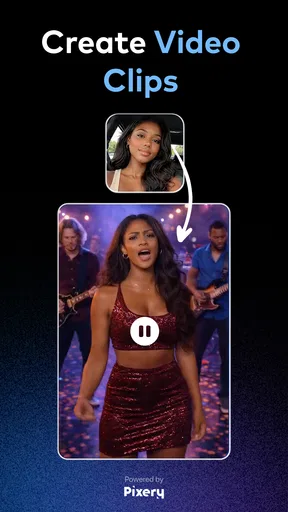
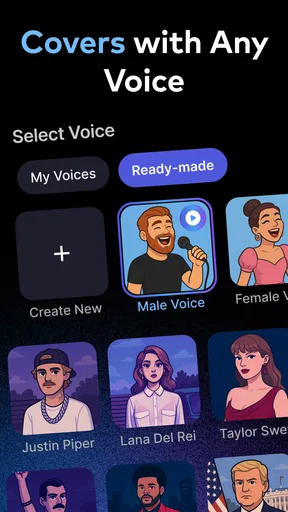
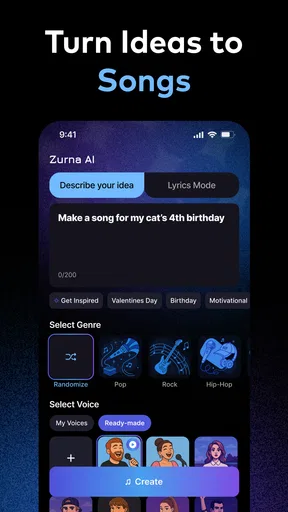
Our Review of Zurna: AI Song & Music Maker
 Analysis by Appyee
I approached Zurna: AI Song & Music Maker as someone who wanted to turn a rough musical idea into something shareable without opening a full digital audio workstation. The app sits in the Music & Audio category and is developed by Pixery Bilgi Teknolojileri. Its appeal is straightforward: start with imagination rather than technical knowledge, then work toward a custom song or a voice-based result. In my experience, that makes it more approachable than traditional music software, although the simplicity also means you give up some control.
The first thing to understand is what kind of tool this is. I would not treat it as a replacement for a complete recording studio, an instrument-learning app, or a detailed editing suite. It is better viewed as a fast creative bridge between an idea and an audio draft. You can begin with a concept, a mood, or a vocal direction instead of building every track manually. That difference matters when you want to make a playful birthday message, test a song idea, or create a quick piece of audio for a social post.
The app is free to install and is suitable for Everyone. It has reached over 100 thousand installs, with an average rating of 4.4 from around 3.2 thousand ratings and 215 written reviews. Those figures suggest that the basic concept is connecting with a meaningful audience, but they should not be confused with the experience of a conventional music editor. People coming from professional production software will notice the difference immediately.
From a rough idea to a finished audio result
I focus here on the moment an idea becomes something you can actually listen to, because that is where this kind of tool earns its place. I find it helps to judge a result against one clear purpose—such as a personal greeting or a quick creative sketch—rather than expecting every attempt to feel finished. That distinction also makes it easier to decide what to refine next.
Starting with the right kind of idea
The best starting condition is a small, specific creative goal. Instead of thinking, “I want to make a complete album,” I would begin with something like a short upbeat song for a friend, a dramatic vocal experiment, or a musical sketch built around a particular feeling. This helps because AI-assisted creation is most useful when it removes the blank-page problem. You still need to decide what you want the result to communicate.
A useful workflow is to prepare a compact brief before opening the app. Decide whether the result should feel cheerful, calm, intense, sentimental, or humorous. Think about who will hear it and whether the voice should sound natural, theatrical, or deliberately unusual. These choices give the creative process direction and make it easier to judge the output later. Without that preparation, it is easy to accept the first interesting result even when it does not fit the original purpose.
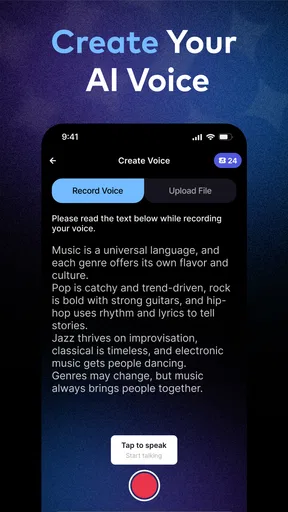
The app’s central promise is that you can create custom songs and experiment with voice cloning without needing formal music skills. I found that most attractive for people who have ideas but do not know how to arrange instruments, record clean vocals, or shape a song inside a complicated timeline. It lowers the entry barrier, but it does not remove the need for taste. The user still has to choose a useful concept, notice weak results, and decide when a version is worth keeping.
Moving through creation instead of traditional production
Once the idea is clear, the experience feels more like directing a creative assistant than operating a studio. You provide the intended direction, review what comes back, and refine your expectations. That handoff is important: the app can help transform an instruction into audio, but it cannot automatically know whether the emotion, pacing, or vocal character matches what you imagined.
I recommend treating each attempt as a draft rather than a final performance. Listen for the parts that matter to your use case. If the song is meant for a personal message, clarity and emotional tone may matter more than intricate musical detail. If it is intended for a creative video, the opening and overall mood may be more important than perfect lyrical phrasing. This mindset prevents frustration and encourages useful iteration.
Voice cloning deserves extra care in the workflow. The feature can be appealing for personal experimentation, but a familiar voice carries identity and trust. I would only use a voice with clear permission and would avoid presenting an artificial performance as if the person had genuinely recorded it. That is not merely a technical consideration; it affects how friends, family, or an audience interpret the result. A fun experiment can become uncomfortable if the handoff between generated audio and real identity is not handled honestly.
A practical everyday scenario
Imagine that a friend’s birthday is approaching and you want something more personal than a standard message. I would start by deciding on a light, cheerful song rather than trying to imitate a professional release. I would shape the concept around a few recognizable details, create a first version, and listen with the recipient in mind. If the result feels too generic, I would adjust the idea instead of simply replaying it and hoping it improves.
The next handoff is from creation to sharing. Before sending anything, I would check whether the words are understandable, whether the voice sounds appropriate, and whether the musical tone suits the person. A generated song can be technically impressive while still feeling emotionally wrong. For a private joke, that may be harmless. For a public post, I would be more selective and make the artificial nature of the audio clear when that context matters.
This is one of the app’s strongest everyday uses: it turns a personal thought into a small audio gift without requiring a microphone, an instrument, or hours of editing. The trade-off is that the result may feel more like a clever creative artifact than a fully human performance. Whether that is a weakness depends on the occasion.
What makes the workflow different from ordinary music apps
With a standard music player, your role is mainly to discover and listen. With a conventional beat-making app, you usually assemble loops, adjust timing, and arrange layers yourself. A recording app puts the focus on capturing your own performance. Zurna takes a different route by placing the idea and the generated result closer together.
That shortcut is valuable when speed matters. Someone who would abandon a traditional editor after seeing a dense timeline may be able to explore a concept here. On the other hand, a musician who wants precise control over every note, take, effect, and transition will probably prefer a dedicated production tool. The choice is not about which category is universally better. It is about whether you want to direct an outcome or build every component.
I also see a difference in the way mistakes are handled. In a manual editor, an imperfect vocal line can often be cut, moved, or corrected in detail. In an AI-led workflow, you may need to rethink the instruction or generate another version. That can be faster for broad changes but less satisfying when only one small detail needs fixing. The app is strongest at turning a concept into a coherent experiment, not at providing microscopic control over a finished mix.
Useful habits for better results
My first practical tip is to separate creative direction from technical judgment. During the first listen, ask whether the idea works at all. Only after that should you worry about small imperfections. This avoids spending time polishing a concept that was never suitable for the intended audience.
My second tip is to keep the intended listener in mind during every handoff. A voice effect that sounds amusing to you may be distracting to someone else. A dramatic arrangement may suit a parody but feel excessive in a sincere message. Thinking about the listener early is more useful than judging the app solely by how surprising the generation feels.
A third useful insight is to save your preferred concept in plain language before experimenting further. If later attempts drift away from the original mood, you can return to that starting point instead of making random changes. This is particularly helpful when you are exploring several voice or song directions and the novelty of each new result begins to blur together.
Finally, I would avoid treating voice cloning as a shortcut for authenticity. It can reproduce the idea of a voice-based performance, but authenticity also depends on consent, context, and the listener’s understanding. For personal projects, that distinction is easy to overlook because the process feels playful. Responsible use keeps the creative result enjoyable rather than misleading.
Where the flow becomes less comfortable
The biggest friction comes from the gap between a simple request and a satisfying result. “Make a song” is not really a complete creative brief. The more vague the starting point, the more likely you are to receive something that sounds acceptable but does not feel personal. Users who expect one tap to produce a release-ready track may be disappointed.
There is also a learning curve, even though the app is designed for people without music skills. The curve is not about reading notation or understanding compression. It is about learning how to describe an idea, how to evaluate a generated voice, and how to decide whether another attempt is worthwhile. That is easier than mastering a full studio, but it is still a creative skill.
The free entry point makes experimentation accessible, while optional in-app purchases range from $6.99 to $44.99 per item. I would begin with the free experience and decide whether the workflow genuinely fits my habits before spending money. The higher end of that range makes the decision more significant, especially for someone who only wants to create one novelty song. A regular creator may see more value, but occasional users should be careful not to pay simply because the first result is exciting.
Another limitation is the difference between a generated result and an editable project. If your goal is to take individual musical parts into another production environment, make detailed corrections, or mix everything manually, this may not be the most efficient starting point. A traditional audio workstation gives you more responsibility and more control. Zurna is more convenient when you want the app to handle much of the construction.
Who should use it and who should skip it
I would recommend the app to curious beginners, casual creators, families looking for personalized audio ideas, and people who enjoy experimenting with artificial voices. It is also a sensible choice for someone who repeatedly has song concepts but never turns them into drafts because conventional music software feels intimidating. The low technical barrier is the main reason to try it.
I would be more cautious if you need professional vocal recording, exact arrangement control, detailed mixing, or dependable consistency across many projects. Musicians who already work comfortably with instruments and production software may find the app restrictive rather than liberating. The same is true for users who want a transparent, hands-on process from the first note to the final export.
Privacy and consent should shape the decision as well. Anyone considering voice cloning should be comfortable with the responsibility that comes with using a recognizable voice. I would not use another person’s voice casually, and I would be especially careful before sharing the result publicly. The feature is most appropriate when the source voice and the audience context are both handled openly.
Device fit, cost, and current state
The application supports Android devices running version 7.0 or later, which gives it broad compatibility with older hardware. That is useful if you are testing it on a spare phone rather than a recent flagship. Still, the quality of an AI-assisted audio workflow can depend on more than the operating system. I would judge the experience on the actual device, especially if you plan to create and review several versions in one sitting.
Pixery Bilgi Teknolojileri currently lists version 1.8.6, and the app was released on May 30, 2025. Those details place it in a relatively early stage compared with long-established audio editors. I would expect the experience to evolve, which is encouraging for a creative app but also a reason to keep expectations realistic. Early versions of ambitious tools can feel exciting while still needing refinement in areas such as control, consistency, and workflow clarity.
The Everyone content rating makes the app approachable for a broad audience, but that does not remove the need for adult guidance around voice identity and public sharing. The technical rating and the social responsibility of generated media are separate questions. I would explain that difference to younger users rather than assuming the age label answers every concern.
My final handoff: deciding whether to keep it
After using the workflow from idea to review, I see Zurna as a creative prompt turned into an audio tool. Its best moment is the first successful transformation: a thought that existed only in your head becomes something you can hear, discuss, and share. That can be genuinely motivating, especially for people who have never felt comfortable inside conventional music software.
Its weaker moment arrives when you want to take control back. A generated song may need another attempt rather than a precise edit, and a voice experiment may raise questions that have nothing to do with musical quality. The app rewards curiosity, but it asks you to accept a certain amount of unpredictability and to make careful decisions about identity and context.
For me, the right recommendation is conditional but positive. Try it if you want quick, imaginative audio drafts and enjoy shaping ideas through iteration. Start with a small personal project, listen critically, and treat voice cloning responsibly. Skip it if your priority is professional recording or detailed manual production. The most useful way to approach Zurna is as a fast creative starting point, not as a complete replacement for a music studio.
That distinction makes the free app easy to understand. It is not trying to teach you every part of music production; it is helping you cross the distance between “I have an idea” and “I can hear a version of it.” For the right user, that is enough to make experimentation feel accessible. For someone who needs exact control, the usual dedicated audio tools remain the better handoff.
Verdict
Strengths of Zurna: AI Song & Music Maker
- Creates song ideas quickly from simple text prompts.
- Offers an accessible way for beginners to experiment with music.
- Useful for generating melodies, lyrics, and creative inspiration.
- Can help overcome writer’s block during songwriting sessions.
- Convenient for making music concepts directly on a mobile device.
Limitations of Zurna: AI Song & Music Maker
- AI results may sound generic or require several prompt attempts.
- Generated vocals and lyrics may lack natural emotion or originality.
- Advanced editing and mixing options may be limited.
- Some features or exports may require a paid subscription.
- Output quality can vary significantly between different generations.
Other Releases by Pixery Bilgi Teknolojileri
View All
Funimate Video Editor & Maker
Video Players & Editors4.3

CloneAI AI Video Generator
Photography2.8

Mythic Survivors
Action4.7

Impresso - Video & Logo Maker
Video Players & Editors4.5
Similar Picks in This Category
View All
YouTube Music
Google LLC4.4

Samsung Music
Samsung Electronics Co., Ltd.3.8

Spotify: Music and Podcasts
Spotify AB4.3

JioSaavn - Music & Podcasts
Saavn Media Limited4.3

Lark Player:Music Player & MP3
Lark Player Studio - Music, MP3 & Video Player4.6

StarMaker: Sing Karaoke Songs
SKYWORK AI PTE. LTD.4.3
Frequently Asked Questions
What is Zurna: AI Song & Music Maker?
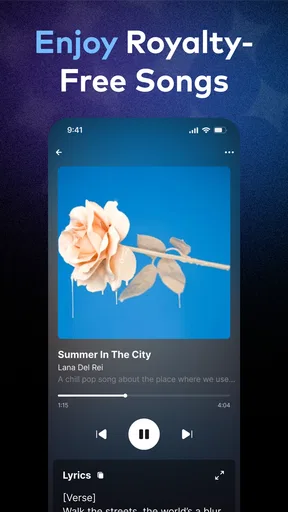
Zurna: AI Song & Music Maker is an AI-powered music creation app designed to help users generate original songs with minimal musical experience. Depending on the available tools, you can usually begin with a text prompt, lyrics, mood, genre, or other creative direction, then let the app produce a song concept or complete track. It is aimed at casual creators, social media users, and anyone experimenting with AI-generated music.
Do I need musical knowledge or special equipment to use Zurna?
No advanced musical knowledge is generally required to start using Zurna. The app is built around guided creation, so beginners can describe the type of song they want instead of composing melodies or arranging instruments manually. A smartphone, the app, and a stable internet connection are normally enough. Headphones are recommended when reviewing generated tracks, especially if you want to notice details in vocals, effects, or instrument balance.
Is Zurna: AI Song & Music Maker free to download and use?
Zurna may be available to download at no initial cost, but some features can be limited by subscriptions, credits, advertisements, or in-app purchases. Restrictions may apply to the number of songs you can generate, audio quality, export options, processing speed, or access to premium styles and tools. Before creating extensively, check the current store listing and in-app pricing, because plans and usage limits can change over time.
Can I use songs created with Zurna commercially?
Commercial usage depends on Zurna’s current licensing terms and the specific plan used to generate or export a track. Some AI music services permit personal sharing but impose restrictions on monetization, advertising, streaming distribution, or ownership of generated content. You should read the app’s license agreement and terms before uploading music to platforms such as YouTube, TikTok, Spotify, or commercial projects. Also avoid using copyrighted lyrics, artist names, or protected material without permission.
Does Zurna require an internet connection, and what privacy issues should I consider?
AI music generation is commonly processed online, so Zurna may require an active internet connection for prompts, audio creation, account synchronization, and cloud-based storage. Your prompts, lyrics, uploaded materials, or generated tracks may be sent to the service’s servers, depending on how the app operates. Before using personal or unreleased content, review its privacy policy, permissions, data-retention practices, and account settings. Avoid submitting sensitive information or material you do not have the right to share.
